
IQOS ILUMA i Charging Issues & Fixes: Everything You Need to Know
Is your IQOS ILUMA i blinking red or not charging? Learn how to reset your device, fix touch screen errors, and where to find the new ILUMA i series in Dubai
On this page · 9 sections
- Decoding the IQOS ILUMA i Light and Screen Signals
- Technical Comparison: ILUMA i vs Previous Generations
- Common Charging Issues and Quick Fixes
- Advanced Features Impacting Your Battery
- How to find new ILUMA i device in Dubai
- Troubleshooting the Touch Screen
- Maintenance Tips for the Dubai Climate
- Frequently Asked Questions
- Final Thoughts
The IQOS ILUMA i has officially arrived in the UAE, bringing a futuristic touch screen and a flexible battery system to the Dubai vaping scene. While these upgrades make the experience smoother, new technology often comes with its own set of questions. If you are seeing a blinking red light or wondering why your screen is showing a flashing zero, you are in the right place.
Looking for the device itself? See the IQOS ILUMA i ONE with current UAE pricing and same-day Dubai delivery.
This guide covers every detail about the IQOS ILUMA i charging issues and their easy fixes. Whether you are at a cafe in Downtown Dubai or relaxing at home, we will help you get your device back to peak performance.
Decoding the IQOS ILUMA i Light and Screen Signals
The biggest change in the “i” series is the interactive touchscreen. Instead of just small LED dots, you now get a digital display that talks to you. Understanding these signals is the first step to avoiding frustration.
The Touch Screen “0” Flash
If you see a digital “0” flashing three times on your holder screen, do not panic. This is the device telling you it is completely discharged. Simply pop it back into the pocket charger. In the Dubai heat, sometimes we use our devices more frequently, and this signal is just a friendly reminder for a quick top-up.
The Yellow vs White Light Mystery
Many users get worried when they see a yellow or orange pulsing light. Here is the secret:
- Blinking Yellow: Your battery is below 7%. It is in “low power mode.”
- Pulsing White: Once the charge crosses that 7% mark, the light automatically turns white.
The Red Blinking Light
A red light is usually a cry for help from the software. It often happens due to a minor glitch or if the device has been exposed to extreme temperatures. Since Dubai summers can be intense, ensure your device stays away from direct sunlight or hot car dashboards to prevent this error.
Technical Comparison: ILUMA i vs Previous Generations
Understanding how the new model performs compared to the standard ILUMA or Prime helps you manage your charging expectations.
| Feature | IQOS ILUMA i (New) | IQOS ILUMA Standard |
| Consecutive Uses | Up to 3 Sessions | 2 Sessions |
| Interface | Touch Screen + LED | LED Lights Only |
| New Features | Pause Mode & FlexPuff | None |
| Charge Time | 135 Minutes (Full) | 135 Minutes (Full) |
| Battery Mode | Performance & Eco Mode | Performance Only |
Common Charging Issues and Quick Fixes
Most charging problems are not hardware failures but simple connection or software hiccups. Before heading to a service center, try these steps.
1. The 10 Second Soft Reset
This is the “magic fix” for 90% of issues. If your lights are acting strange or the touch screen is unresponsive:
- Place the holder inside the pocket charger.
- Press and hold the main button on the pocket charger for exactly 10 seconds.
- The lights will fade out and then blink twice.
- Your device is now reset and should function normally.
2. Cleaning the Magnetic Contacts
Even though the ILUMA i uses the Smartcore Induction System (no blade), it still relies on metal pins to transfer power from the charger to the holder. Over time, dust or skin oils can create a barrier. Use a dry cloth or a specialized cleaning Terea stick to gently wipe the bottom of the holder and the pins inside the charger.
3. The Power Source Check
Dubai is full of high-speed chargers, but the IQOS ILUMA i is picky. Always use the official IQOS power adapter and USB-C cable. Using a laptop port or a cheap third-party brick might cause the device to charge extremely slowly or not at all.
Advanced Features Impacting Your Battery
The ILUMA i introduces “FlexBattery” technology. This allows you to choose how you want your device to behave, which directly affects how often you need to charge it.
Pause Mode and FlexPuff
- Pause Mode: You can now pause your session for up to 8 minutes. However, using this feature consumes a bit more battery than a standard continuous session.
- FlexPuff: This smart feature analyzes your puff pattern and might give you an extra 4 puffs. If you are someone who takes short, light puffs, you will see the light ring extend anticlockwise, indicating these extra moments.
Performance vs Eco Mode
You can toggle these modes via the IQOS app.
- Performance Mode: The default setting. Gives you 3 consecutive uses but a standard battery lifespan.
- Eco Mode: Limits you to 1 use at a time but extends the overall lifespan of your battery by up to one year. This is a great choice if you want your device to last for many years.
How to Clean Your IQOS ILUMA i for the Best TEREA Flavor Every Time
How to find new ILUMA i device in Dubai
If your current device is beyond repair or you are looking to upgrade to the touch screen experience, Dubai offers several premium options for purchasing.
The Official Boutique Experience
For the best service, visit the IQOS Boutique in The Dubai Mall. It is located on the first floor and offers a luxury environment where you can try the new Electric Purple or Breeze Blue colors. The staff there can also help you with a professional deep clean of your current device.
Online Delivery in the UAE
If you prefer shopping from your sofa, the official IQOS UAE Terea Dubai online website is excellent. We offer same-day delivery in Dubai if you place your order before 12:30 PM. This is perfect for those who need a replacement TEREA stick or a new kit urgently.
Local Prices (2026 Estimates)
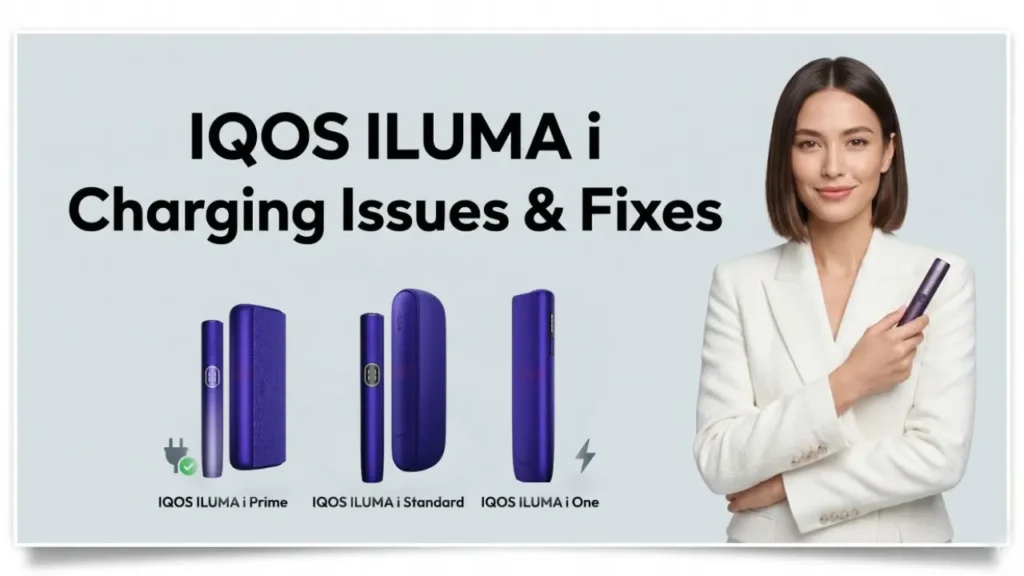
- IQOS ILUMA i Prime: 400 AED (The premium choice with a leather wrap).
- IQOS ILUMA i Standard: 240 AED (The classic pebble shape).
- IQOS ILUMA i One: 150 AED (The all-in-one portable unit).
- IQOS ILUMA i Electric: 300–700 AED (Advanced smart device with premium features)
Troubleshooting the Touch Screen
The screen is sensitive to conductive materials. If you find it is not responding to your swipes:
- Ensure your fingers are clean and dry.
- Do not use gloves.
- Swipe across the entire length of the screen. A quick swipe (faster than half a second) is required to activate Pause Mode.
- If you keep the holder in your pocket with keys, the screen might activate accidentally. Always store the holder inside the pocket charger to avoid this.
Maintenance Tips for the Dubai Climate
Living in the UAE means dealing with high humidity and heat. To keep your ILUMA i battery healthy:
- Avoid the Car: Never leave your device in a car parked at the Mall of the Emirates or JBR. Temperatures inside can exceed 60 degrees, which permanently damages lithium batteries.
- Firmware Updates: Regularly connect your device to the IQOS app. Manufacturers often release software patches that improve battery efficiency and fix touch screen lag.
Frequently Asked Questions
Can I use my old ILUMA Prime charger for the new ILUMA i?
Yes, the chargers are cross compatible. You can charge an ILUMA i holder in an older ILUMA pocket charger, though you might not see the full “i” specific light animations.
Why does my IQOS ILUMA i blink red after a few puffs?
This usually means the device has overheated. Let it cool down for 5 minutes in an air conditioned room, then perform the 10 second reset.
Is the ILUMA i available in all Dubai retail stores?
While many smaller shops carry it, we recommend buying from authorized retailers or boutiques to ensure you get the official warranty and a genuine UAE version.
Final Thoughts
The IQOS ILUMA i is a significant step forward for the brand. By understanding the new touch screen signals and keeping the charging pins clean, you can avoid almost every common issue. If you are in Dubai, you have the advantage of world class support and quick delivery options to keep your experience seamless.
Remember, if the 10 second reset does not work and your device is still blinking red, it might be time for a warranty claim. Keep your receipt and visit the Dubai Mall boutique for a quick diagnostic check. Stay charged and enjoy the tech.
Writes for Terea Heets Dubai. About our editorial team
 IQOS BONDS and BLENDS Explained: How the System Works in the UAE
 IQOS ILUMA User Manual Guide: Setup, Usage, and Maintenance
 When Should You Replace Your IQOS ILUMA Device: Signs of Wear
 How to Clean Your IQOS ILUMA i for the Best TEREA Flavor Every Time
 Why Your ILUMA i Feels Weak After Updates (And How to Fix It)
 Short Puffs vs Long Puffs on ILUMA i: Which Is Better?