
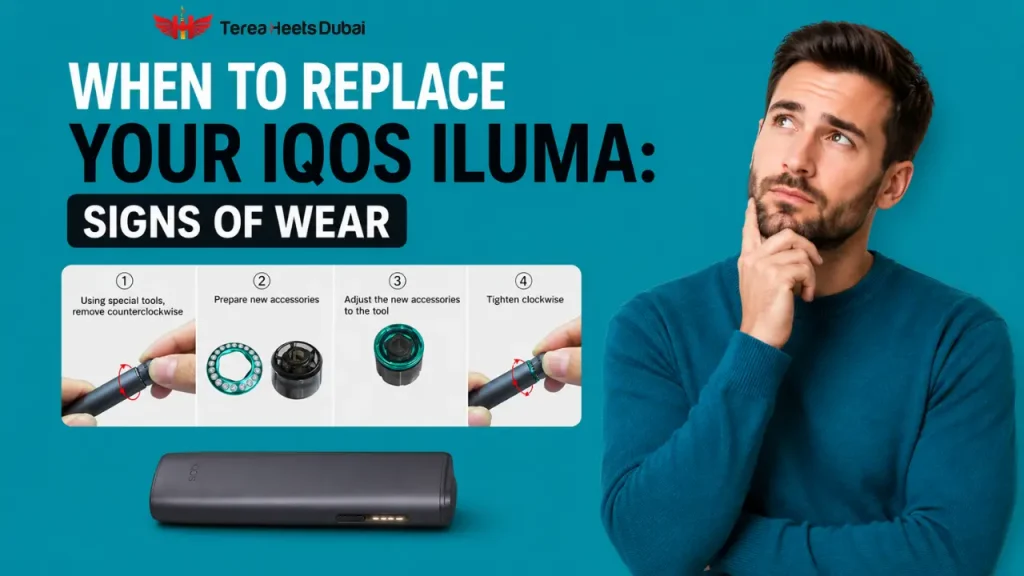
When Should You Replace Your IQOS ILUMA Device: Signs of Wear
Wondering how long your IQOS ILUMA should last? Learn the real signs of battery wear, what your warranty actually covers, and when to replace it in the UAE.
On this page · 10 sections
- What Is a Normal IQOS ILUMA Lifespan
- The Real Signs Your IQOS ILUMA Battery Is Wearing Out
- How to Check Your IQOS ILUMA Battery Yourself
- ILUMA i Standard vs PRIME vs ONE: Battery Numbers That Actually Matter
- Does the Warranty Cover Battery Wear? The Answer Nobody Tells You
- Repair, Warranty Claim, or Replace: How to Decide
- How to Get More Life Out of Your Current Device
- Buying a Replacement in the UAE
- Frequently Asked Questions
- Conclusion
If you are asking how long does an IQOS ILUMA device last, you are probably already noticing something off, shorter sessions, a battery that drains faster than it used to, or a device that just feels tired. That instinct is usually right. Every IQOS ILUMA battery wears down over time, and knowing the real signs of wear saves you money and stops you guessing. This guide walks through what a normal IQOS ILUMA battery life actually looks like, how to check yours, and the one thing about the warranty that almost nobody explains clearly.
What Is a Normal IQOS ILUMA Lifespan
A typical IQOS ILUMA device lasts between one and two years with normal daily use before you notice a real drop in performance. Most users see the first signs of battery decline around twelve to eighteen months in, depending on how often they charge it and how it is stored. This is not a fault, it is just how rechargeable lithium batteries behave, the same way a phone battery fades after a couple of years.
The Real Signs Your IQOS ILUMA Battery Is Wearing Out
Here is what actually shows up when a battery starts to fail, not vague symptoms, but the specific things you will notice day to day.
- Shorter sessions than before: the device used to get you through the whole day, now it needs charging twice as often.
- It will not hold a charge: you charge it fully, and an hour later it is already flashing low.
- Random shutdowns: it powers off mid session even though the indicator showed charge remaining.
- Overheating during normal use: a little warmth is fine, too hot to hold comfortably is not.
- Inconsistent charging light: the light blinks unpredictably or charging starts and stops on its own.
- Reduced flavor or uneven heating: sticks taste weaker or burnt sooner than they used to, which often points to inconsistent heating rather than a bad stick.
One or two of these on their own are not a big deal. Several of them together, especially fast draining plus overheating, usually mean the battery has genuinely reached the end of its useful life.
How to Check Your IQOS ILUMA Battery Yourself
Before assuming the worst, run through this quick check. It takes under five minutes and tells you exactly where you stand. The method depends slightly on which device you own, since ILUMA i ONE works differently from the Standard and PRIME.
If You Own ILUMA i Standard or ILUMA i PRIME (Holder Plus Pocket Charger)
- Fully charge the holder and pocket charger overnight so you are testing from a true full charge.
- Note the time and use the device normally for one full day.
- Count how many sessions you get before the pocket charger needs recharging.
- Compare that number to when the device was new. A healthy holder should manage two consecutive sessions before it needs the charger again.
- If you are getting noticeably fewer sessions, or the charger itself drains faster than before, that confirms battery wear rather than a one off glitch.
- Clean the metal contacts on both the holder and the charger with a dry cloth, then repeat the test once. If nothing improves, the battery is the problem, not dirt or a loose connection. Our ILUMA i charging issues and fixes guide covers this step in more detail if the problem turns out to be fixable.
If You Own ILUMA i ONE (All in One Device)
ILUMA i ONE has no separate pocket charger, so the holder to charger comparison above does not apply. Test it this way instead.
- Fully charge the device overnight from a genuine IQOS cable.
- Use it normally and count total sessions from that one full charge.
- A healthy ILUMA i ONE should manage around twenty sessions per full charge.
- If you are getting noticeably fewer than twenty, or it needs topping up mid day, that points to battery wear.
If your device supports the IQOS app, you can also check battery health and session history there directly through Bluetooth, rather than counting sessions manually every time.
ILUMA i Standard vs PRIME vs ONE: Battery Numbers That Actually Matter
Since battery capacity and session count differ across the ILUMA i lineup, it helps to see the real numbers side by side before deciding whether your device is underperforming or just built differently.
| Device | Consecutive Uses per Holder Charge | Sessions per Full Charge | Charging Time |
|---|---|---|---|
| ILUMA i Standard | 2 | Around 20 | About 135 minutes |
| ILUMA i PRIME | 2 to 3 | Around 20 | About 135 minutes |
| ILUMA i ONE | Not applicable, single unit | Around 20 | About 90 minutes |
If your device is falling noticeably short of these numbers even when new, that points to a manufacturing issue worth a warranty claim rather than normal wear.
Does the Warranty Cover Battery Wear? The Answer Nobody Tells You
This is the part almost every guide skips, and it matters more than anything else on this page. The IQOS device warranty covers manufacturing defects. It does not cover the battery simply getting older, because battery performance decline is treated as normal wear rather than a fault. That means the exact problem you are probably dealing with right now is one your warranty was never designed to fix.
| Covered by Warranty | Not Covered by Warranty |
|---|---|
| Manufacturing defects in material or workmanship | Battery performance decline from normal use |
| Device that fails to power on when new (DOA) | Cosmetic wear like scratches that do not affect function |
| Faulty holder or charger under proper use | Damage from liquid, drops, or misuse |
| One time accidental damage cover for registered ILUMA i PRIME users | Devices with altered or missing serial numbers |
In the UAE, a standard IQOS device comes with a one-year warranty from the date of purchase. If you register the device within the first thirty days, ILUMA i models get extended to 24 months. Miss that 30-day window and the extra year is gone for good; it cannot be added back later no matter the reason.
Warranty terms above confirmed against official IQOS UAE sources as of August 2026. Terms can change, so always check your account for the exact status of your own device.
How to File a Warranty Claim if You Are Covered
- Log into your account at iqos.com/ae and go to the My Devices section.
- Find your device by its serial number, which is on the box or the device itself.
- Click through the self-diagnosis steps so the system can confirm the issue before you submit.
- Submit your claim once the diagnosis flags it as covered.
- If approved, a replacement is typically delivered within 24 hours in major UAE cities, or you can visit the IQOS boutique in person with your device and proof of purchase.
A quick word of caution: never open the holder or pocket charger yourself to try to swap the battery. Doing so voids the warranty immediately and risks damaging the device beyond repair, since these are sealed units not designed for user replacement. Read the full guide: How to Customise Your IQOS ILUMA i Device via the IQOS App
Repair, Warranty Claim, or Replace: How to Decide
Once you know the signs and understand what the warranty will and will not cover, the decision usually sorts itself out quickly. Work through it in this order.
- Check if the device is still within warranty and registered: If yes, and the problem looks like a genuine fault rather than battery age, file a claim first since replacements are typically delivered within twenty four hours in major UAE cities.
- If it is out of warranty and under eighteen months old: a simple fix like cleaning the contacts or a firmware update is worth trying before spending money.
- If it is over eighteen months old with two or more wear signs together: repair costs rarely make sense. A new device usually works out cheaper than trying to nurse an aging battery along.
- If you keep having the same issue repeatedly after fixes: that is the clearest signal to stop troubleshooting and just replace it.
How to Get More Life Out of Your Current Device
Before you reach the end of the road, a few habits genuinely slow down battery wear.
- Avoid leaving the device in direct sun or a hot car, heat is the fastest way to age a battery.
- Charge it fully rather than topping it up constantly in short bursts.
- Wipe the exterior and charging contacts regularly rather than letting residue build up.
- Store it somewhere dry when not in use, moisture speeds up internal wear.
If you want the full walkthrough on keeping the device clean without damaging it, our guide on how to clean your IQOS ILUMA i for the best flavor covers exactly what to wipe and what to avoid.
Buying a Replacement in the UAE
If you have decided a replacement is the right move, buy from an authorized seller like Terea Dubai rather than an unverified listing. Devices with unclear serial numbers or mismatched packaging usually will not qualify for UAE warranty support at all, which puts you right back in the same position a year from now.
Frequently Asked Questions
How long does an IQOS ILUMA battery actually last?
Most users notice the first real decline between twelve and eighteen months, with the device typically lasting one to two years overall before replacement becomes the sensible option.
Is my IQOS ILUMA battery dead or just low?
If a full charge still leaves you with very few sessions, or the device shuts off despite showing charge remaining, that points to a worn battery rather than it simply being low.
Why is my IQOS ILUMA battery not charging?
Dirty metal contacts are the most common cause. Wipe both the holder and charger contacts with a dry cloth first. If that does not help, the charging component itself may have failed.
How do I reset my IQOS ILUMA device?
Press and hold the button on the holder or charger for around ten seconds until the light blinks white, then release. This clears minor glitches without affecting your warranty status.
Does IQOS ILUMA device update fix battery problems?
A firmware update can resolve some charging inconsistencies, but it will not restore a battery that has genuinely aged. If problems continue after updating, the battery itself is the issue.
Where can I buy an IQOS ILUMA device near me in the UAE?
Stick to authorized UAE retailers so your device is properly registered and warranty eligible from day one, rather than a grey market seller with no local support.
Conclusion
A slowing IQOS ILUMA is not a mystery, it is a battery reaching the end of a fairly predictable lifespan. The signs are easy to spot once you know what to look for, and the warranty situation is simple once someone actually explains it, manufacturing faults are covered, ordinary battery aging is not. Run the quick check above, weigh it against how old your device is, and you will know within minutes whether a clean and a firmware update will do the job or whether it is genuinely time for a new one.
Writes for Terea Heets Dubai. About our editorial team
 IQOS BONDS and BLENDS Explained: How the System Works in the UAE
 IQOS ILUMA User Manual Guide: Setup, Usage, and Maintenance
 TEREA Stick Not Recognized by IQOS ILUMA? Possible Causes Explained
 How to Fix IQOS ILUMA i Lift-to-Status and Tap-Display Lag
 Why Does IQOS ILUMA i FlexBattery Cancel Your Pause Session Automatically?