
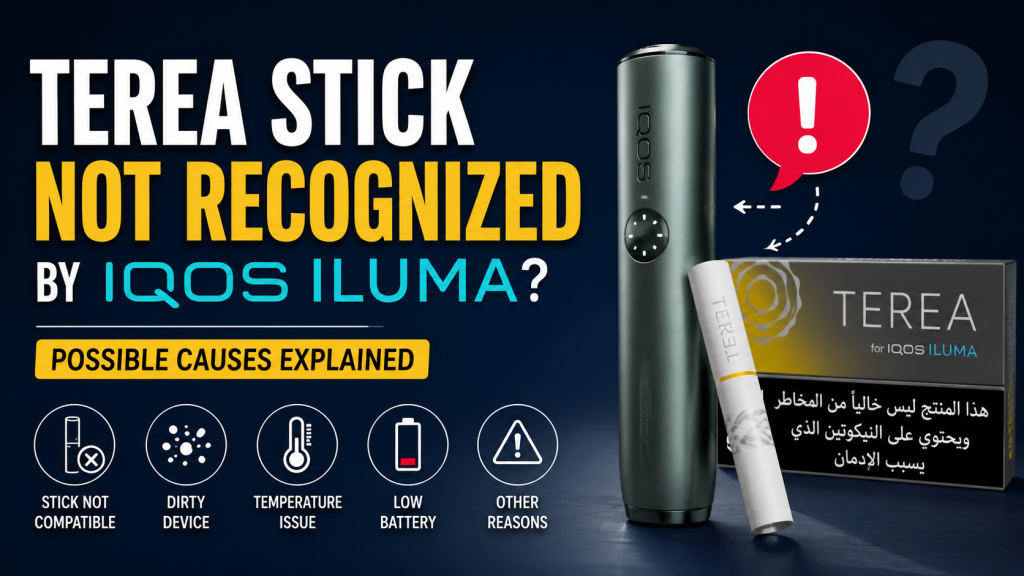
TEREA Stick Not Recognized by IQOS ILUMA? Possible Causes Explained
IQOS ILUMA won't recognize your TEREA sticks? Here are the 9 real causes from insertion errors to counterfeit sticks and exactly how to fix each one problem.
On this page · 9 sections
- Why IQOS ILUMA Has to “Recognize” a Stick in the First Place
- The Real Reasons Behind a “Stick Not Recognized” Error
- Quick Diagnostic: Match the Light Pattern to the Cause
- Step-by-Step: How to Fix It
- How to Avoid This Happening Again
- Genuine vs. Counterfeit TEREA: Why It Matters
- Still Not Working? When to Get Help
- Final Thoughts
- Frequently Asked Questions
You push the stick in, wait for the familiar vibration or the light to come on and nothing. No heating, no aerosol, just a device that seems to be ignoring the TEREA stick sitting right where it should be. It’s an annoying moment, but it’s rarely a sign that your IQOS ILUMA is broken. In almost every case, “stick not recognized” comes down to one of a handful of specific, fixable causes and once you know what to check, most of them take under a minute to sort out.
This guide walks through why ILUMA has to “recognize” a stick at all, the nine most common reasons that recognition fails, how to tell which one you’re dealing with, and what to do about each, plus how to stop it happening again.
Why IQOS ILUMA Has to “Recognize” a Stick in the First Place
Older IQOS devices heated tobacco sticks with a physical blade. ILUMA doesn’t. It uses the SMARTCORE INDUCTION SYSTEM, which heats a thin metal core built directly into the TEREA stick using induction, magnetic energy passed through the holder rather than a heated blade making contact. We’ve covered the mechanics of this in more detail in why TEREA works better in ILUMA than older IQOS devices, but the short version matters here: because heating depends on that metal core sitting correctly inside the induction coil, “recognition” is really the device confirming a genuine, properly-seated core is present before it commits to a session.
That single design detail explains almost every cause on this list. Anything that interferes with the stick’s core, its alignment, or the coil’s ability to read it will register as the device “not recognizing” the stick, even though nothing is actually broken.
The Real Reasons Behind a “Stick Not Recognized” Error
1. The Stick Isn’t Fully or Evenly Seated
This is the single most common cause. TEREA sticks need to go in straight and pushed in fully to the marked line,even a slight angle or a few millimeters of gap is enough to break the induction alignment. If the stick also feels loose or shifts around once inserted, that’s usually the same root issue.
Fix: Remove the stick completely and reinsert it firmly and evenly, following the insertion guide on the underside of your device lid.
2. A Broken Stick Is Still Lodged in the Holder
If a previous stick snapped or crumbled during removal, part of it paper, filter, or core fragment can remain stuck in the chamber. The device may then refuse a new stick entirely, or seem to detect “something” without heating properly. This is a slightly different problem from the airflow blockages.
Fix: Use a wooden toothpick, never a metal object to gently clear any leftover material, then try a fresh stick.
3. You’re Using a Non-TEREA or Counterfeit Stick
ILUMA can only read TEREA’s specific induction core. HEETS and other blade-format sticks simply don’t have the right core to trigger detection, and counterfeit “TEREA” sticks are often just out of spec enough that the coil can’t get a clean read. This is one of the more overlooked causes because the stick looks correct from the outside.
Fix: Confirm you’re using genuine TEREA made specifically for ILUMA. Buying from an authenticated TEREA source removes this variable from the equation entirely.
4. Debris Is Blocking the Induction Contacts
Tobacco residue and ash buildup around the chamber opening can sit between the stick’s core and the coil, interfering with the read. This tends to show up as intermittent recognition working with some sticks, failing with others, rather than a total failure every time.
Fix: Clean the chamber with the brush/cleaning tool that came with your device, and wipe the metal contacts with a dry cloth. Our guide on cleaning and maintaining your IQOS device covers the full routine.
5. The Device Is Outside Its Operating Temperature
ILUMA operates within a specific temperature range, and outside it, all lights blink white twice and the device shuts the attempt down, which can easily look like a stick problem rather than a temperature one. In the UAE, this is more common than people expect: a device left in a hot car, or one that’s just come out of strong air conditioning, can trip this protection.
Fix: Let the device return to a normal indoor temperature before trying again.
6. You’re Trying to Reheat an Already-Used Stick
Once a TEREA stick has been used, the device flags that state and won’t reactivate it, even though the holder can still detect that a stick is physically present. If it feels like the device “senses” the stick but won’t do anything with it, this is usually why.
Fix: Use a fresh stick. Used ones can’t be reheated regardless of how they’re reinserted.
7. The Battery Is Too Low to Run Detection
Detection and heating both draw power, and if the holder is close to empty, it may not have enough charge to complete the recognition sequence at all, sometimes with no response whatsoever.
Fix: Fully charge the holder in the pocket charger. If charging itself seems to be the underlying problem rather than just a flat battery, see our dedicated ILUMA charging issues guide.
8. A Software Glitch Needs a Reset
Occasionally the device’s internal system hits a temporary fault, sometimes after a firmware update and stops recognizing sticks correctly even though nothing physical is wrong. This usually shows up alongside a red blinking light.
Fix: Perform a hard reset. Our step-by-step ILUMA reset guide walks through the exact button-hold sequence.
9. The TEREA Pack Was Stored Poorly
TEREA sticks shouldn’t be kept somewhere too humid or too dry, both can affect the paper and core enough to cause inconsistent detection or poor aerosol quality even when the device itself is fine. If you’re unsure whether storage is the issue, our guides on TEREA storage tips and whether TEREA sticks expire cover this in detail.
Fix: Store TEREA packs sealed, at moderate room temperature and humidity, until you’re ready to use them.
Quick Diagnostic: Match the Light Pattern to the Cause
Before you assume the worst, check what the device is actually telling you. We go into full detail on every pattern in our ILUMA light and vibration signals guide, but as a starting point:
| What you see | Likely cause |
|---|---|
| White light blinks twice, then switches off | Temperature protection, not a stick problem |
| Red light blinking | System/software error, try a reset |
| Single yellow tap | Battery too low |
| Vibrates but won’t heat | Insertion/seating issue |
| No response at all | Check charge first, then insertion, then try a different stick |
Step-by-Step: How to Fix It
Work through these roughly in order, most people solve it within the first three steps:
- Remove the stick and reinsert it firmly, straight, and fully seated
- Check for and clear any broken stick debris with a wooden toothpick (never metal)
- Try a different, genuine TEREA stick from a fresh, sealed pack
- Clean the holder chamber and contacts
- Fully charge the device
- Let the device return to room temperature if it’s been in heat or strong AC
- Perform a hard reset
- If none of the above works, contact IQOS support or your device’s warranty service
How to Avoid This Happening Again
A few habits go a long way toward preventing this issue from recurring. Buy TEREA only from a verified, authorized seller, it removes the counterfeit-core variable entirely. Store sticks properly and don’t let a pack sit somewhere too hot, cold, or humid. Clean the ILUMA holder on a regular schedule rather than only reaching for the brush once something goes wrong. And keep the device charged rather than routinely running it down to empty, especially if you’re heading out for the day.
Genuine vs. Counterfeit TEREA: Why It Matters
Counterfeit sticks are one of the more easily missed causes of a “not recognized” error, precisely because the induction core inside isn’t manufactured to the tolerances ILUMA expects. The packaging can look convincing, batch and authenticity markers may be missing or inconsistent, and pricing that seems unusually low relative to other UAE sellers is often the clearest tell. Shopping from a verified TEREA range built for ILUMA takes this variable off the table completely, which matters more than it might seem, a single bad batch of counterfeit cores can make an otherwise perfectly healthy device look faulty.
Still Not Working? When to Get Help
If you’ve worked through every cause above and the device still won’t recognize any stick, genuine or otherwise, it’s worth reading our more detailed, fix-focused companion guide, IQOS ILUMA i Not Detecting TEREA Sticks: Fix Guide, which walks through the same troubleshooting from a slightly different angle and may catch something this one didn’t. For a broader look at ILUMA issues beyond stick recognition, battery, heating, connectivity, our common IQOS ILUMA issues and solutions guide is a good next stop. If the problem persists after that, it’s time to contact IQOS support or an authorized service center, repeated failures across multiple genuine sticks usually point to a hardware fault rather than anything you can fix at home.
Final Thoughts
Most “stick not recognized” errors trace back to something small, a slightly loose insertion, a low battery, a bit of debris, rather than a genuine device fault. Work through the checks above in order, and if genuine sticks are still being rejected across the board, that’s your signal to move on to a service check. And if counterfeit sticks turn out to be part of the problem, browsing our authenticated TEREA range for ILUMA is the simplest way to make sure it doesn’t happen again.
Frequently Asked Questions
Why does my IQOS ILUMA say the stick isn’t recognized even though it looks fine?
A stick can look perfectly normal on the outside while still failing to register, the most common reasons are a slightly angled insertion, debris around the induction contacts, or a battery too low to complete the detection sequence. Start with reinsertion and a quick clean before assuming the stick itself is at fault.
Can a used TEREA stick be reinserted and reheated?
No. Once ILUMA has used a stick, it flags that state internally and won’t reactivate it, even though the holder may still register that a stick is physically present. You’ll need a fresh stick.
Does hot weather affect TEREA stick recognition in Dubai?
Yes. ILUMA operates within a set temperature range, and a device left in a hot car or exposed to intense sun can trigger a temperature-protection response that looks like a stick isn’t being recognized. Letting the device cool to room temperature usually resolves it.
Will HEETS sticks work in an IQOS ILUMA?
No. ILUMA’s induction system is built to read TEREA’s specific metal core, and HEETS sticks, designed for blade-based devices, don’t have the right core to trigger detection at all.
How do I know if my TEREA stick is genuine?
Check the packaging quality, batch and authenticity markers, and be cautious of pricing that’s noticeably lower than other established UAE sellers. Buying from a verified TEREA retailer is the most reliable way to rule this out completely.
Writes for TEREA HEETS Dubai. About our editorial team
 IQOS BONDS and BLENDS Explained: How the System Works in the UAE
 IQOS ILUMA User Manual Guide: Setup, Usage, and Maintenance
 When Should You Replace Your IQOS ILUMA Device: Signs of Wear
 How to Fix IQOS ILUMA i Lift-to-Status and Tap-Display Lag
 Why Does IQOS ILUMA i FlexBattery Cancel Your Pause Session Automatically?